Everything Your Team Needs to Call Better
Desk phones, headsets, IP PBX, Cloud PBX and softphone apps, supplied, set up and supported by one team. Pick a category below, or ask us for a ready-to-go bundle.
Need help choosing the right PBX package?
Share your number of users, locations, phone lines and DID requirements. The team can recommend whether Basic, Basic Plus or Basic Pro is more suitable before you purchase hardware.
A Business Phone System That Helps Customers Reach the Right Person Faster
A good PBX setup is not only about buying phones. It should help your company answer calls professionally, transfer calls smoothly, record important conversations and prepare for future growth.
Cleaner Call Handling
Route incoming calls to reception, sales, support or accounts with extension calling, call transfer and call forwarding.
Office & Branch Friendly
Suitable for single-office teams, multi-department companies and branch locations that need a more structured calling flow.
Better Control & Growth
Build a phone system that can support call recording, user changes, department routing and future expansion.
Not Sure How Many Phones You Need?
Send your office layout, number of staff and call flow requirement. The sales team can help estimate the package, DID, SIP trunk and setup scope.
Ask for RecommendationWhat This Page Helps You Decide
Use this guide to compare bundle sizes, included hardware, DID options and the information needed for a faster quotation.
PBX Office Bundle Packages
Choose a ready-to-deploy office PBX bundle based on business size. Package prices below are for listed hardware items and exclude setup and installation.
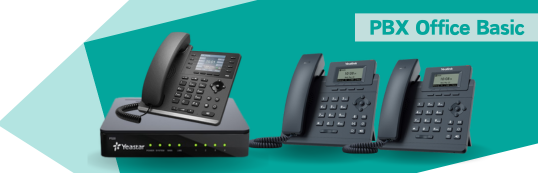
Basic Bundle
P520 – RM2,988
| Item | Qty |
|---|---|
| P520 IP-PBX | 1 |
| Yeastar O2 Module | 1 |
| Yealink SIP-31G (Include adapter) | 1 |
| Yealink SIP-T30 Non-POE | 2 |
3-year warranty on PBX & O2 Module
1-year warranty on SIP-31G
3-year warranty on phones
Excludes setup & installation
Basic Plus
P520 – RM3,988

| Item | Qty |
|---|---|
| P520 IP-PBX | 1 |
| Yeastar O2 Module | 1 |
| Yealink SIP-31G (Include adapter) | 3 |
| Yealink SIP-T30 Non-POE | 5 |
3-year warranty on PBX & O2 Module
1-year warranty on each SIP-31G
3-year warranty on phones
Excludes setup & installation
Basic Pro
P520 – RM4,988

| Item | Qty |
|---|---|
| P520 IP-PBX | 1 |
| Yeastar O2 Module | 1 |
| Yealink SIP-31G (Include adapter) | 5 |
| Yealink SIP-T30 Non-POE | 10 |
3-year warranty on PBX & O2 Module
1-year warranty on each SIP-31G
3-year warranty on phones
Excludes setup & installation
Sales tip: If your company is unsure which bundle to choose, start by counting users who need desk phones, users who can use softphones, departments that need call transfer, and whether each branch needs its own DID or shared call routing. Want different phones or a bigger PBX? Browse all Yealink IP phones, Yeastar IPPBX models and headsets, or skip the box entirely with Cloud PBX.
Explore All Phones & Hardware
Not looking for a bundle? Each category has its own page with more details, options and help choosing.
- IP PhonesYealink desk, cordless and video phones for every desk and team.Explore →
- IP PBXYeastar PBX systems, expansion modules and VoIP gateways for your office.Explore →
- HeadsetsWired, Bluetooth and DECT headsets that stay comfortable all day.Explore →
- Cloud PBXA complete business phone system in the cloud, with no PBX box to buy.Explore →
- Softphone AppAnswer office calls on your mobile or computer, wherever you are.Explore →
- Conference PhonesMeeting room audio, speakerphones and Microsoft Teams devices.Explore →
- Video Meeting RoomsVideo bars and room systems for Zoom meetings of any size.Explore →
- Video DoorphonesSee and talk to visitors before you open the door.Explore →
- Facial AttendanceTouchless staff attendance with face recognition and door access.Explore →
Which Package Is More Suitable?
Use this simple guide before sending an enquiry. It helps the sales team recommend the right phone quantity and setup scope.
| Business Situation | Suggested Direction | Why It Matters |
|---|---|---|
| Small office with reception and a few staff | Basic Bundle | Lower starting cost with core PBX and phone setup. |
| Growing team with several departments | Basic Plus | More phones for reception, sales, admin and operations users. |
| Larger office or higher call volume | Basic Pro | More endpoints for users and easier extension planning. |
| Multiple branches, SIP trunk or special call routing | Request consultation | Network, DID, routing and installation scope should be checked first. |
DID Number Package
DID numbers allow customers to call your business directly. Options may depend on documentation, address verification and provider availability.
| No. | Item | Price |
|---|---|---|
| 1 | Malaysia DID (6 months) | RM 30 × 6 = RM 180 |
| 2 | Other Country DID (6 months) | RM 70 × 6 = RM 420 |
DID Preparation
Address verification required for international DIDs
DID registration form + company documents
Minimum 6-month subscription
Excludes setup & installation
We reserve the right to change specs, pricing, or terms without prior notice.
100% payment upon order confirmation. Cancellations incur a 20% fee.
Delivery: ex-stock or 2–6 weeks after confirmation.
Warranty covers manufacturing defects only. RMA freight is borne by customer.
Common PBX Use Cases
This page is suitable for customers who want a practical business phone system, not only standalone phone hardware.
Sales & Enquiry Teams
Improve call ownership by routing incoming calls to the right extension or department.
Office & Factory
Connect admin, operations, warehouse and management users with internal extension calls.
Multi-Branch Business
Plan a cleaner branch communication flow with PBX, DID and SIP trunk requirements reviewed together.
How to Start Your PBX Enquiry
A few details are enough for the team to understand your requirement and advise the next step.
Share Your Business Details
Company name, PIC name, contact number, email, address and business nature.
Confirm Users & Locations
Number of staff who need phones, departments involved and whether you have one or multiple offices.
Review DID, SIP Trunk & Call Flow
Tell the team whether you need new DID numbers, existing line migration, call recording or IVR.
Receive Package Recommendation
The team can recommend suitable hardware, setup scope and next action based on your requirement.
Fast Quote Checklist
Copy and send these details to speed up the enquiry:
- Company Name
- PIC Name
- H/P Number
- Address / Office Location
- Business Nature
- Number of Users / Phones Needed
- Need DID number or SIP trunk?
- Existing phone system or new setup?
IP-PBX & VoIP Bundle FAQ
These quick answers help customers understand package selection, installation scope, DID number and SIP trunk requirements before contacting the sales team.
Which PBX bundle should my company choose?
Choose based on the number of users, phones, departments and locations. Basic is suitable for a small office, Basic Plus is better for growing teams, and Basic Pro is suitable when more extensions or departments are required.
Does the PBX bundle include setup and installation?
The listed package prices exclude setup and installation. Share your location, number of users and cabling condition so the team can advise the setup scope.
Can this IP PBX connect with SIP trunk and DID number?
Yes. The PBX can be planned together with SIP trunk connectivity and DID number requirements, subject to provider availability, registration documents and configuration scope.
Can calls be transferred between departments or branches?
Yes. IP PBX systems can support extensions, call transfer, call routing and branch-friendly setup depending on network connectivity and configuration.
What information should I prepare before requesting a quote?
Prepare company name, PIC name, contact number, email, address, business nature, number of users, number of locations, required DID number and whether existing phones or cabling will be reused.
Is warranty included?
The listed bundles include warranty coverage stated on the page: 3-year warranty for PBX and O2 module, warranty for selected Yealink IP phones, and warranty subject to manufacturer terms.
Request a PBX Package Quote
Speak with the team to discuss IP-PBX, SIP trunk, DID number, office phones and installation requirements.
Contact Sales
- Mr. Ho: +60 12 687 2201
- WhatsApp: Send PBX Enquiry
- KL Office: +60 3 2780 3880
- Penang Office: +60 4 2024 033
- JB Office: +60 7 4890 353
- Email: sales@mobiweb.com.my
Tell Us What You Need
Get the Right PBX Setup Before You Buy
A suitable business phone system depends on users, locations, DID number, SIP trunk, call routing and installation scope. Share your requirement and the team will assist with the next step.
Call Sales WhatsApp Now