sales@bizcloud.asia WhatsApp 1: +603-2780 3801 WhatsApp 2: +6016 450 2380 KL: +603 2780 3880 PG: +604 2024 033 JB: +607 4890 353
Cloud PBX Calls CDR Analytics Agent KPI

Make every business call easier to monitor. Turn PBX records into clear management reports.

PBX.com.my VoIP Analytics helps Malaysian businesses turn Cloud PBX call records into a clear reporting dashboard. Owners and managers can check incoming calls, answered calls, missed calls, talk time, agent productivity and follow-up opportunities without reading raw CDR logs.

1dashboard for call performance
24/7call records for review
KPIagent activity and productivity view
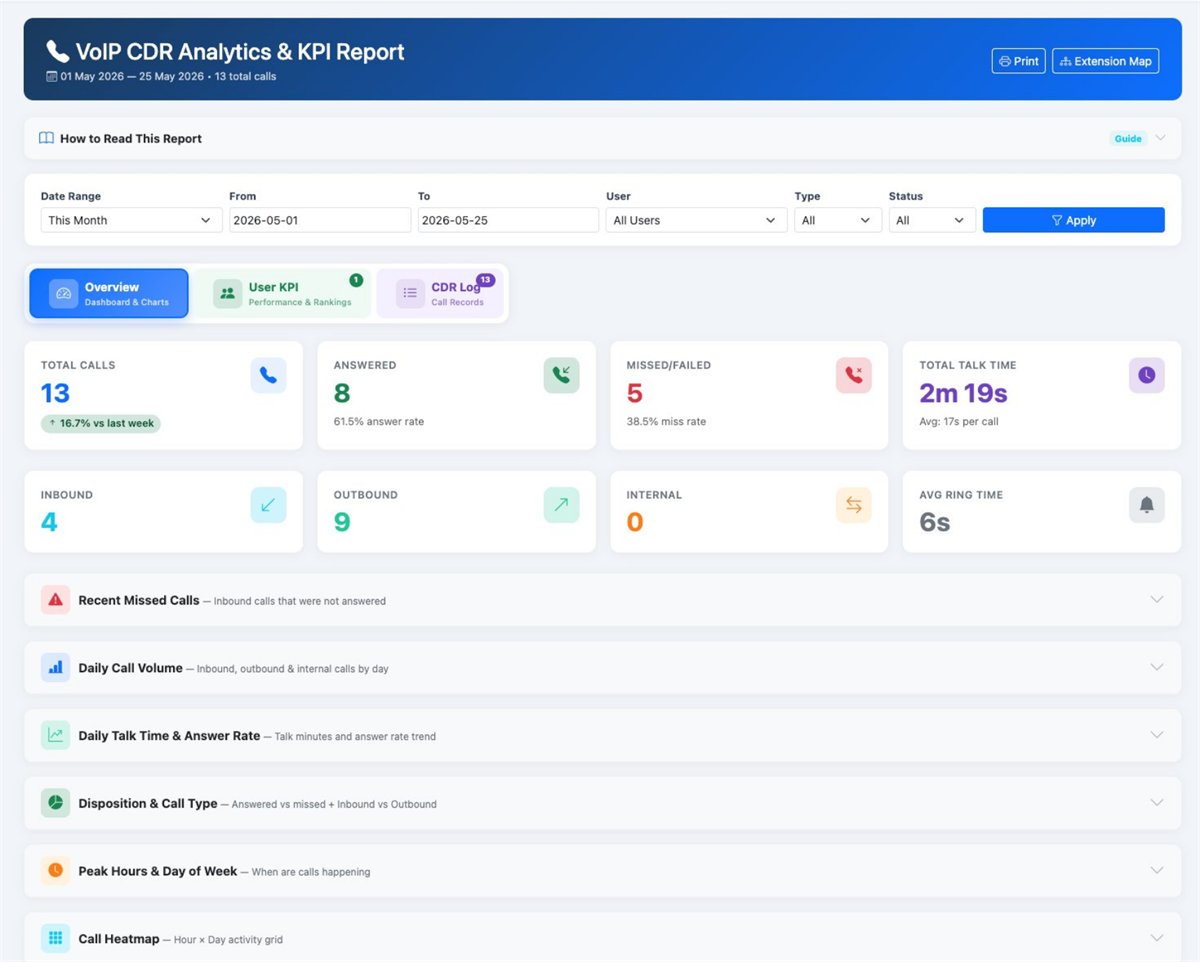
VoIP CDR Analytics and KPI Report overview with total calls, answered calls, missed calls and total talk time

The Overview tab of the VoIP CDR Analytics & KPI Report: total calls, answer rate, missed calls, talk time and the inbound, outbound and internal split for the period you choose.
The common business problem

Your PBX already records important call data. Now make it useful for business decisions.

Many companies still depend on manual staff updates such as “today was busy” or “we already called back”. With a proper VoIP analytics dashboard, owners can verify call volume, missed calls, agent workload, follow-up quality and busy hours from one place.

Missed calls become missed sales

Customers who cannot reach your team may contact competitors. VoIP Analytics helps you identify missed calls quickly so your team can follow up before the opportunity is gone.

Staff workload is hard to prove

Some agents may appear busy, while others quietly handle more calls. Call reports help management review workload and performance based on real data.

Reports are checked too late

If call records are only checked when problems happen, management is always reacting late. A clear dashboard helps owners monitor call health more regularly.

The result: business owners do not get the full picture of customer calls. Missed enquiries, weak follow-up and uneven agent performance may continue without proper visibility.

Main product features

Four practical VoIP report views for clearer call management

The page is organised around the reports most business owners need: call overview, call history, agent performance and extension mapping. Each report helps management understand what is happening without checking raw PBX logs.

1
Boss view

VoIP KPI Dashboard

See total calls, answered calls, missed calls, talk time and call trends from one simple screen.

Best for: daily management review and quick call health checking.
2
Call visibility

CDR History Report

Review call records with caller number, extension, direction, duration and status for easier follow-up and dispute checking.

Best for: checking missed calls, callbacks and customer communication history.
3
Staff accountability

Agent & User KPI Reports

Compare agent call activity, productivity, score and call handling so managers can coach staff more fairly.

Best for: sales teams, support teams, reception teams and call center review.
4
PBX control

Extension Mapping

Map PBX extensions to users and teams so call records are easier to understand and assign to the correct person.

Best for: keeping reporting clean across departments, branches and agents.
Report 01

VoIP KPI Dashboard

This is the daily call performance dashboard for business owners. Instead of asking staff for manual updates, you can see the overall call situation directly: how many calls came in, how many were answered, how many were missed and how much time your team spent speaking with customers.

Business owner question answered:

“Are we answering customer calls properly today, or are sales opportunities being missed?”

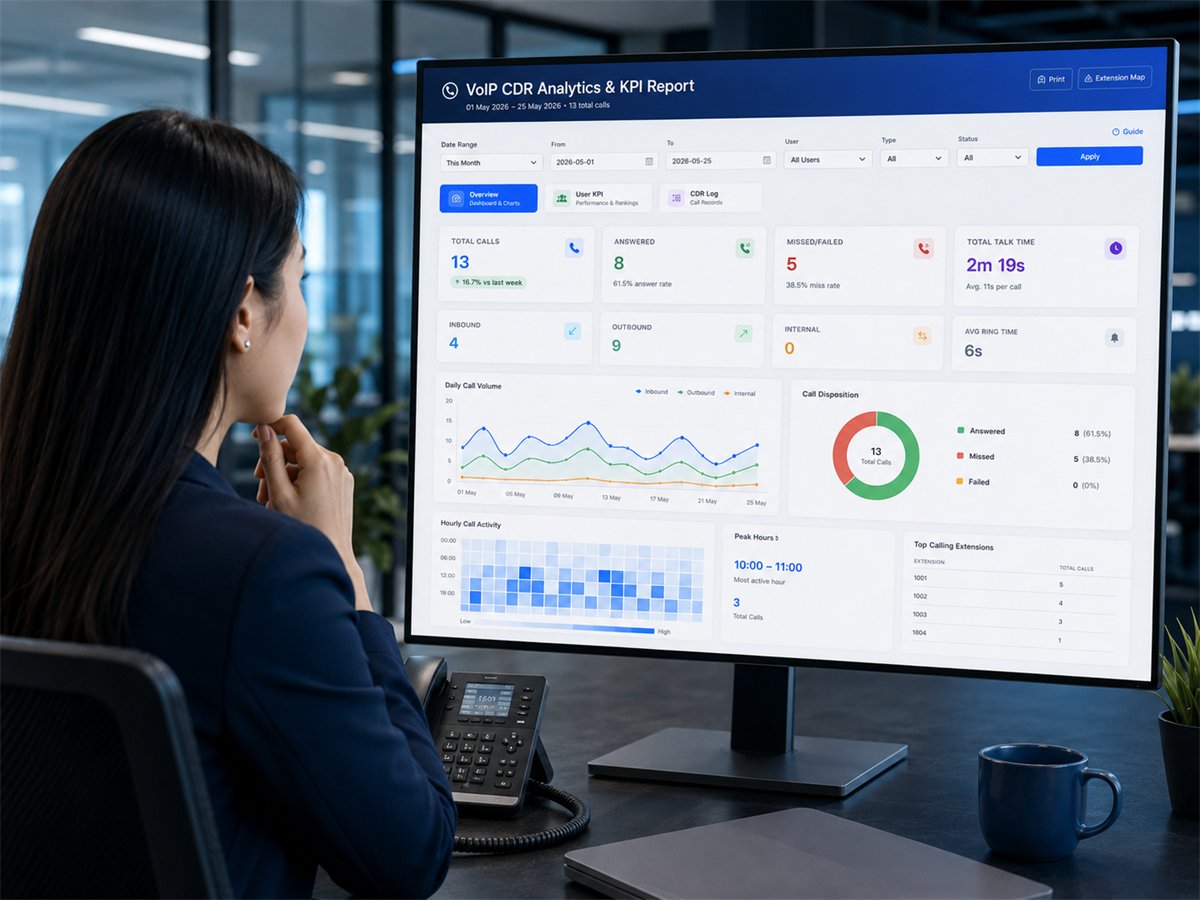
Manager reviewing the VoIP KPI dashboard showing daily call volume, call disposition and top calling extensions

The same dashboard in daily use: daily call volume, answered versus missed, the hour-by-hour heatmap, peak hours and the extensions making the most calls.

Total calls

Understand the overall number of incoming, outgoing and internal calls handled by the business.

Answered calls

See whether customers are able to reach your team and which period has stronger answer performance.

Missed calls

Identify calls that require follow-up before customers become frustrated or look for another supplier.

Talk time

Measure call duration and speaking time to understand customer service workload more accurately.

Report 02

CDR History Report

Call Detail Records help your team check what really happened during customer calls. Managers can filter records, verify call status, confirm call duration and trace whether a missed call was followed up properly.

Manager question answered:

“Which customer called, who handled it, and what should we follow up next?”

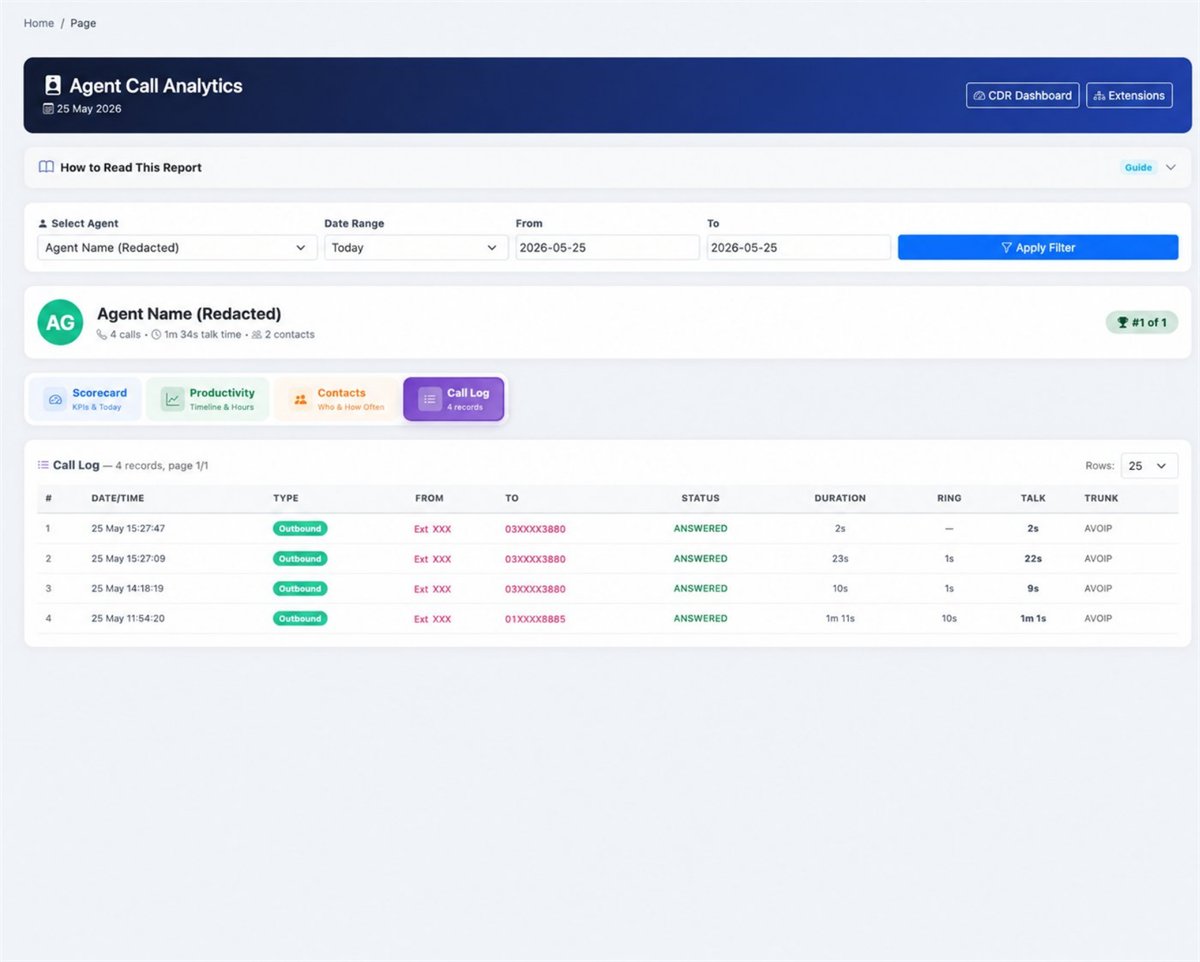
VoIP call log listing call records with date and time, direction, status, ring time and talk time

Call log: every call with date and time, direction, extension, the number dialled, status, ring time, talk time and trunk.

Business owner checking Cloud PBX call records on the VoIP analytics dashboard

Checking the day’s call records straight from the dashboard, without asking anyone to prepare a manual report.

Trace call records

Search and review historical call records when customers ask about missed calls, callbacks or follow-up status.

Filter by status

Separate answered, missed and outgoing calls so managers can identify urgent follow-up faster.

Improve accountability

Use real call logs to reduce guessing, avoid internal disputes and improve team follow-up discipline.

Report 03

Agent & User KPI Reports

Your best staff are not always the loudest staff. VoIP Analytics helps managers compare calls handled, call duration, productivity and call activity by user, so team performance can be reviewed based on actual work done.

Team leader question answered:

“Who is handling customers well, who is overloaded, and who needs coaching?”

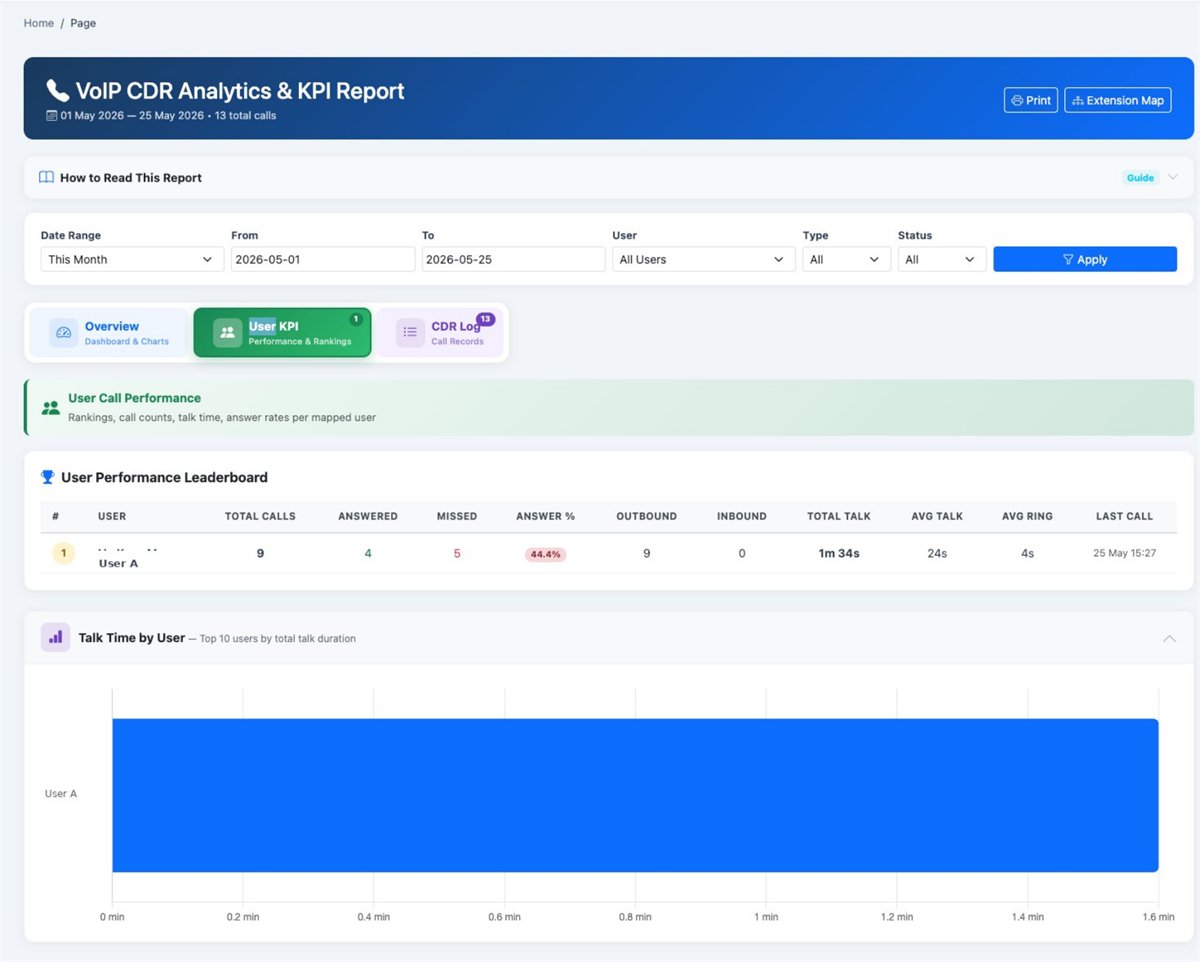
VoIP user KPI leaderboard comparing total calls, answered calls, answer rate and talk time by user

User KPI: a leaderboard of total calls, answered, missed, answer rate and talk time for every mapped user.

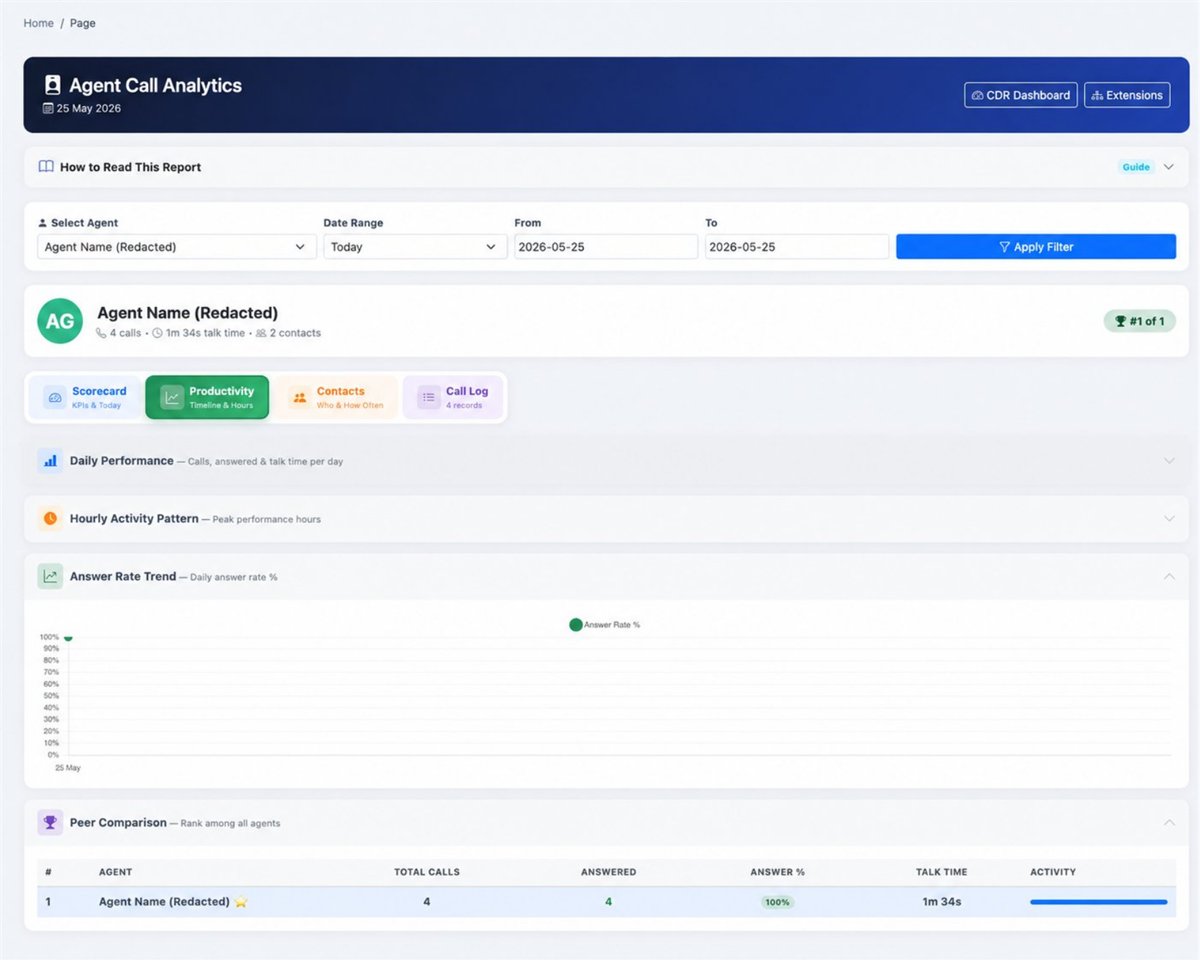
VoIP agent productivity report showing daily performance, hourly activity pattern and answer rate trend

Productivity view: daily performance, hourly activity pattern, answer rate trend and how one agent compares with the rest.

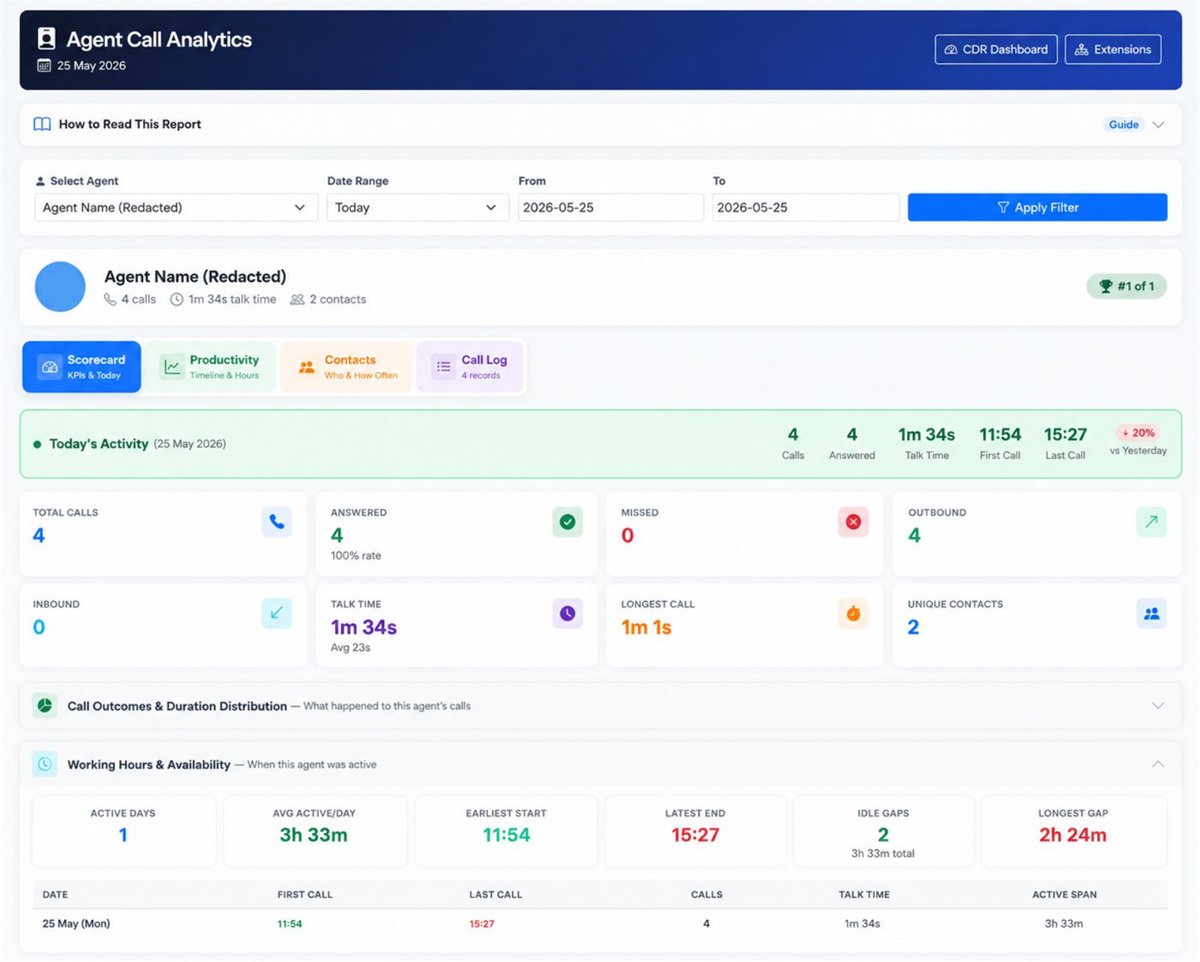
VoIP agent scorecard showing calls, answer rate, talk time, longest call and working hours

Agent scorecard: today’s calls, answer rate, talk time, longest call, idle gaps and working hours for one agent.

Rank call activity

Compare users based on call volume, answered calls and activity level to understand real contribution.

Measure productivity

Identify who is consistently handling customer calls and who may need more support or training.

Coach with data

Use call records and KPI reports during staff review instead of relying only on opinions or manual reports.

Report 04

Extension Mapping & Contact View

Clean reporting starts with proper mapping. PBX.com.my VoIP Analytics helps connect PBX extensions to the correct users, departments or branches, so call reports are easier for management to read and act on.

Operations question answered:

“Which extension belongs to which user, and how do we keep call reporting organised?”

Extension mapping screen linking each PBX extension to a named user

Extension mapping: each PBX extension linked to a named user, so reports show people instead of extension numbers.

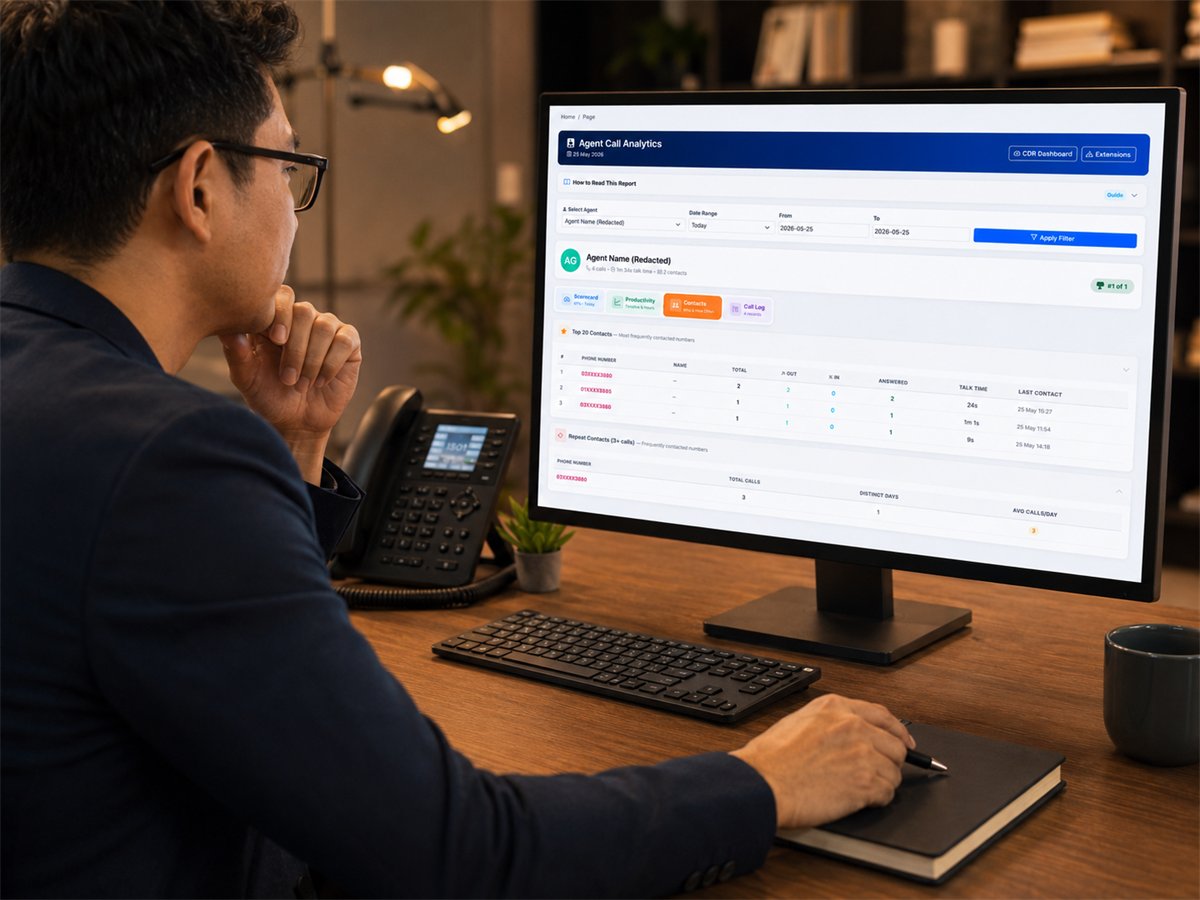
VoIP contacts report showing the most frequently contacted numbers and repeat callers

Contacts view: the numbers your team contacts most often, and which customers keep calling back.

Organise extensions

Assign extensions to users or departments so call records are not just numbers on a report.

Support branches

Make it easier to monitor sales, support or branch-level call activity in a structured way.

Improve follow-up

Link call activity to customer contact information so staff can respond faster and more accurately.

Why business owners need it

Turn phone call records into better sales control, faster follow-up and stronger staff management

VoIP Analytics is not just a technical report. It is a business management tool that helps you protect customer enquiries, improve staff accountability and make better decisions from your Cloud PBX call data.

Reduce missed opportunities

Missed calls become visible, so your team can call back faster before customers move on.

Evaluate staff more fairly

Managers can review call workload and agent performance using real call records, not assumptions.

Improve response discipline

Call history and missed call reports help teams follow up on time and reduce forgotten enquiries.

Spot call trends

Understand peak hours, busy days and call patterns so you can plan manpower more confidently.

Support sales and service teams

Give supervisors a clearer way to monitor phone enquiries, callbacks and customer support activity.

Use PBX data properly

Your Cloud PBX already stores useful call records. Analytics makes the data easier for owners to understand.

Suitable for growing businesses

Built for companies where phone calls still bring real business

PBX.com.my VoIP Analytics is suitable for any business where missed calls, slow callbacks or poor call handling can affect sales, customer satisfaction or management control.

Customer service teams

Monitor call volume, answer performance and missed enquiries more clearly.

Sales teams

Track inbound enquiries, outbound follow-up and call activity by agent.

Multi-branch companies

Keep extension and user reporting organised across branches or departments.

Call-heavy businesses

Use call records to improve reception, hotline, support and appointment handling.

See These Reports On Your Own Call Records

Tell us what phone system you run today and what you wish you could see. We will show you which of these reports your setup can already produce, and what needs to change if something is missing.

Prefer to talk it through? WhatsApp our team.

  • A walkthrough of the reports using your kind of call volume
  • Advice on what your current PBX can already report
  • Works with our Cloud PBX and supported IP PBX systems
  • No obligation

Tell us about your business

Your details are used only to answer this enquiry. Protected by reCAPTCHA. Prefer WhatsApp? +603-2780 3801

Ready to manage your PBX call records more clearly?

Let PBX.com.my help you turn Cloud PBX call records into a practical analytics dashboard for missed call tracking, agent KPI review and better customer follow-up.